MX records explained simply: they are the public pointer that tells a sending server which host accepts mail for your domain. They do not create an inbox. They do not set Header From. They do not load-balance two providers. If leftover Google or Microsoft MX still sits next to a new host, senders split. Some messages arrive. Others vanish. That split looks random. It is DNS.
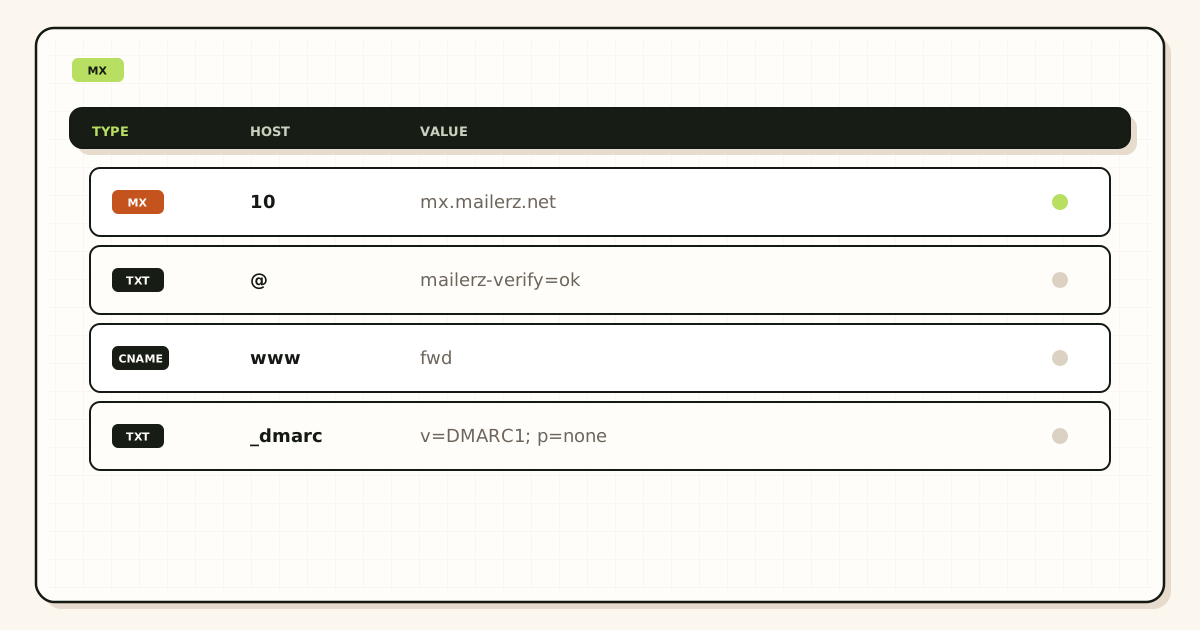
Quick answer for mx records explained
An MX record is a DNS resource record. The sending server looks up the domain, reads the mail exchanger names and their preference numbers, and opens SMTP to one of those hosts. That is the path in IETF RFC 5321 — Simple Mail Transfer Protocol after the address is parsed. DNS itself is described in IETF RFC 1035 — Domain names. Everything after the connection—named aliases, catch-all hold, SRS on the envelope—is the receiving system’s policy. MX only chose the door.
People search “mx records explained” after a cutover. They published MailerZ MX in the registrar panel. The panel still shows an old Google MX they forgot. Half of vendors stay on Workspace. Tests from a personal Gmail sometimes work and sometimes do not. The founder adds catch-all. The founder rotates passwords. MX was never one set.
MailerZ treats leftover MX as a hard stop. Publish the hosts the dashboard lists. Delete every other MX at Google, Microsoft, the registrar, and any leftover Cloudflare Email Routing records you no longer want. Confirm the same answer from two public resolvers, not only the panel that accepted your edit. Then prove inbound from another mailbox. Self-send can lie.
Priority numbers are preference, not a load balancer. Lower numbers are tried first. Two providers at different priorities is a failover story senders may not honor the way you hoped. Two providers at the same priority is a coin flip. Neither is “high availability” for a small domain. One MX set is the safe default.
See leftover hosts before you change aliases. Public DNS is the source of truth, not the registrar screenshot.
Open DNS troubleshootingThe real decision behind MX
The user problem is not “what does MX stand for.” The problem is “which host should every sender use, and how do I prove it.” Teams mix MX with mailbox seats, SPF, and catch-all. Those are different objects. MX is only inbound location.
Decision one: who accepts mail for this domain. One answer. MailerZ, Google Workspace, Microsoft 365, or a host you still pay. Not two. Decision two: where humans read mail. That is the destination inbox—Gmail or Outlook—after MailerZ forwards. Decision three: who sends as the domain. That is paid SMTP, not MX.
A domain with no MX and no A/AAAA fallback may bounce or sit in a retry queue. A domain with a null MX (covered in the next article in this cluster) is an explicit “we do not accept mail.” A domain with leftover MX accepts mail in two places and loses the copy you expected.
When one MX set is enough
- You control every printed address and can map aliases.
- Gmail or Outlook is already the store.
- You can delete old Google or Microsoft MX today.
- You will prove from another mailbox after TTL.
When MX is the wrong lever
- You need Calendar and a hosted mailbox. Buy the suite. MX to MailerZ will not grow Exchange.
- You need IMAP collection for a helpdesk. MailerZ has no IMAP.
- You need newsletters. MX does not send campaigns.
- You are debugging a Gmail From revert. That is SMTP, not MX.
Agencies should treat MX as a cutover artifact. Write the old hosts, the new hosts, the TTL, and the two-resolver proof in the statement of work. “We updated DNS” is not a handoff. The next person will add Google MX back “for Calendar” and split mail again.
Founders on Free can publish MX. Free still holds unknown local-parts and has no send-as. MX success is inbound to named aliases. It is not a complete email product. Read docs for the verification TXT and host names. Do not invent MX hostnames from memory.
Registrar UI lies in two common ways. It shows records you saved that have not reached the authoritative nameservers. Or it shows records on the registrar’s DNS while the domain’s nameservers are still at Cloudflare or the old host. Edit the zone that actually answers. Tools and public lookups beat the green checkmark in the panel.
Technical mail flow after an MX lookup
The sending server extracts the domain from the recipient address. It queries DNS for MX. If MX exists, it sorts by preference and connects. If MX is missing, some senders fall back to the domain’s A or AAAA record. Do not rely on that fallback. Publish MX on purpose or publish a null MX on purpose. Silence is not a policy.
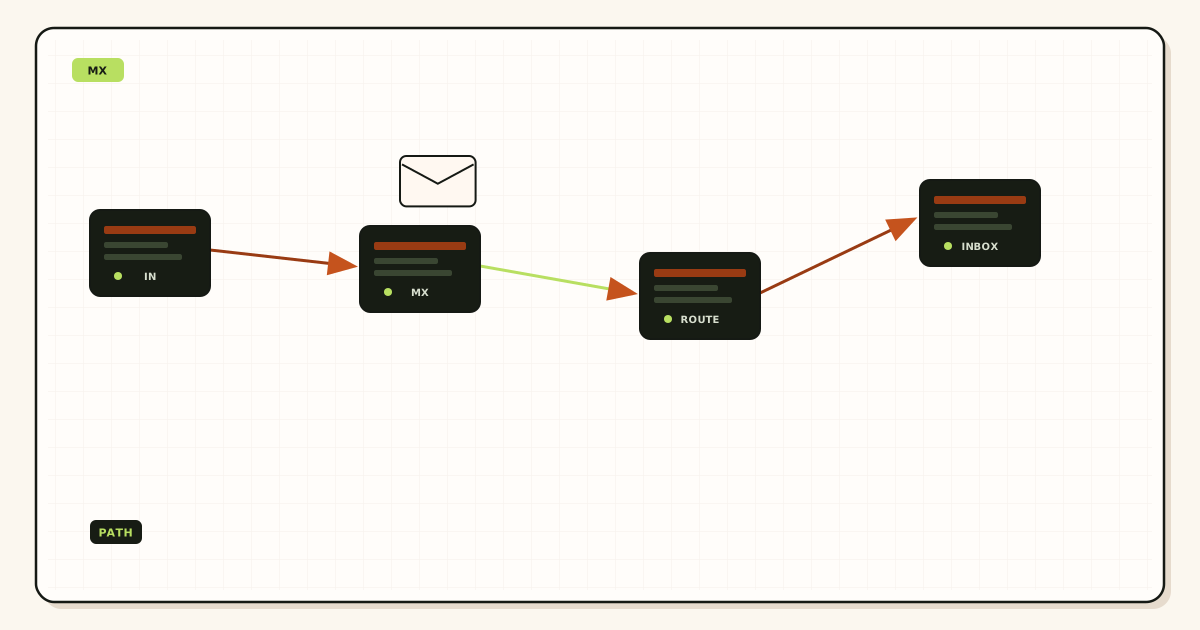
What MX does not do
MX does not authenticate you. SPF, DKIM, and DMARC describe outbound. MX does not rewrite Header From. MailerZ leaves Header From, Subject, Date, Message-ID, body, and MIME untouched on the forward. Envelope MAIL FROM uses SRS so the hop does not fail SPF at Gmail or Outlook. Inbox placement is still the destination’s decision. Not an SLA.
MX does not create aliases. If MX points at MailerZ and hello@ is not in the table, Free holds the unknown. Paid catch-all FORWARD is optional. A perfect MX set with an empty alias table still loses printed names.
MX is not SMTP send-as. Clients that submit outbound mail use a different hostname, port, and password. Pointing Outlook’s outgoing server at an MX host is a common failure. Copy the dashboard SMTP pair. Do not reuse MX names.
Priority, TTL, and caches
Preference 10 is tried before 20 when both hosts are listed. Senders may skip a host that refuses the connection. They do not “balance” 50/50 unless they choose to. Do not publish MailerZ at 10 and Google at 20 as a rollback plan you intend to keep. That leftover 20 still receives a fraction of mail forever.
TTL is how long resolvers may cache the old set. Lower it a day before a cut if you control it. After you delete leftover MX, some caches still answer the old hosts until TTL dies. Keep the old host accepting mail during that window if you still need those copies. Do not add the old MX back “to be safe.” You extend the split.
Authoritative nameservers matter more than the registrar brand. If NS points at Cloudflare, edit Cloudflare. If NS points at the registrar, edit the registrar. A record saved in the unused panel never becomes MX. The migration planner exists to keep that order honest: migration planner.
Step-by-step decision path
- Photograph current public MX from two resolvers. Write the hostnames. That is your rollback evidence and your leftover list.
- Decide the single receiving product. MailerZ if you want aliases into Gmail or Outlook. A suite if you need hosted mailboxes. Not both.
- Add the domain and verification TXT in MailerZ before you flip MX if you chose MailerZ. Create named aliases first.
- Publish the MX set the dashboard lists. Delete leftover MX everywhere. Confirm two public resolvers match.
- Wait TTL if the old set was cached. Do not declare success from the registrar UI alone.
- Prove inbound from an unrelated mailbox to each printed alias. Unique titles. History plus destination copy.
- Only then touch send-as or catch-all. Dirty MX makes every later switch look haunted.
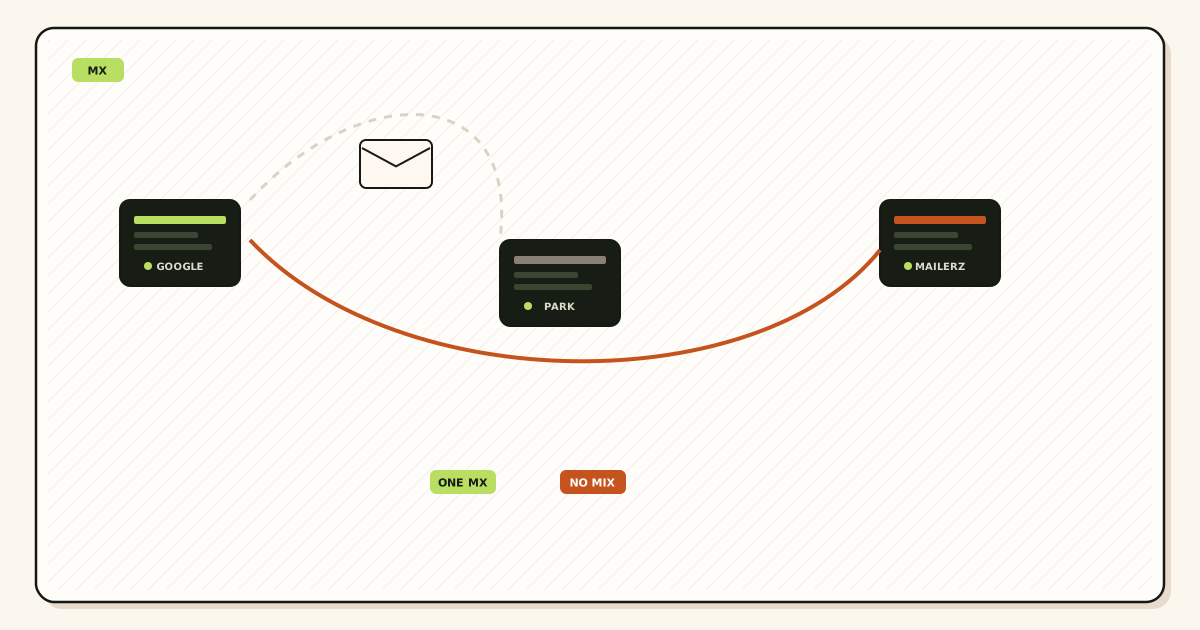
Worked examples
A studio published MailerZ MX and left aspmx.l.google.com in the zone. Stripe receipts arrived in Workspace. Customer mail from a non-Google sender hit MailerZ. They deleted leftover Google MX. Two resolvers agreed. The “random” loss stopped. Catch-all was never the fix.
A founder edited MX at GoDaddy while NS still pointed at Cloudflare. The GoDaddy panel showed the new records. The internet still served Cloudflare’s old Google MX. Public lookup exposed it. They edited Cloudflare. Same Friday, different zone.
An agency dual-published “until we are sure.” Tests from Gmail to the same Gmail passed (short-circuit). External probes failed half the time. They deleted leftover MX, waited TTL, and re-probed from a third provider. Sure is two matching resolvers plus destination copies, not a feeling.
A retailer had no MX and wondered why some hosts delivered to the web server’s A record. A contact form on that server accepted SMTP like a hobby host. They published MailerZ MX and shut the accidental MTA. MX explained is also “stop accepting mail on the web box.”
A household domain used one MX at the old cPanel host and one at MailerZ with the same preference. Family mail split. They picked MailerZ, deleted cPanel MX, and mapped three aliases on Free. The leftover host kept running until TTL died, then they cancelled it.
Walk leftover MX before you argue about aliases. Public DNS is faster than another password reset.
Open MailerZ toolsFailure modes and proof
| Symptom | Likely cause | Proof |
|---|---|---|
| Random missing mail | Leftover MX. Split senders. | Two public resolvers. Delete extra hosts. |
| Panel shows new MX, internet does not | Wrong nameserver or TTL. | NS lookup. Authoritative answer. |
| Self-send works, others fail | Gmail short-circuit. | Unrelated mailbox. |
| Named alias missing, MX looks clean | Alias not created. Wrong destination. | Table. History. Destination spam. |
| Mail hits the website host | No MX. A-record fallback. | MX empty. Publish a real set. |
| All mail rejected | Null MX or host not accepting. | MX target. SMTP banner. History. |
| Outbound 550, inbound fine | Send-as, not MX. | Plan. SMTP pair. Approved From. |
| Old host still gets copies after delete | TTL cache. | Wait. Do not add old MX back. |
Proof is public MX plus a received message plus history. Registrar screenshots are not public DNS. Composer UI is not inbound. Destination junk folders can hide a successful forward. Header From stays the original sender, so filters score that sender.
Loops happen when MX points at a host that forwards back to the same domain without exiting to Gmail or Outlook. Destinations must be external mailboxes. MX pointing at MailerZ is fine. The alias destination must leave the domain.
MailerZ workflow and product boundary
Secuno LLC operates MailerZ. Site: mailerz.net. App: mail.mailerz.net. MX is how the internet finds MailerZ. MailerZ then applies aliases. It is not a mailbox product.
What MailerZ does with MX
- Tell you the MX hosts to publish after verification.
- Treat leftover MX as a hard stop until deleted.
- Accept named aliases on that MX path.
- Hold unknowns on Free. Optional paid FORWARD.
- Preserve Header From. Envelope SRS only.
- Refuse open relay with SMTP 550 for unhosted or unauthorized recipients.
What MailerZ does not do
- Edit your DNS for you unless you use a tool that you operate.
- Load-balance with leftover Google MX.
- Host IMAP, Calendar, or webmail.
- Send-as on Free.
- Promise inbox placement, uptime SLAs, review counts, SOC 2, ISO 27001, or HIPAA. Controls: Security and Trust Center.
Plans: pricing. Free $0, 1 domain, 10 aliases, 1 seat, 14-day store, send-as disabled, SMTP and API disabled. Solo $40/year, 25 aliases, 90-day, 2,500 outgoing, 20 send-as/hour. Starter $8 or $80, 8 / 50 / 5, 5,000 outgoing, 40/hour. Business $19 or $190, 25 / 200 / 25, 12,000, 60/hour. Agency $39 or $390, 100 / 500 / 50, 20,000, 60/hour. Annual Starter, Business, and Agency include two months free versus monthly. Solo is yearly only. Limits are capacity, not an inbox SLA.
Forwarding model: email forwarding. MX gets the message to MailerZ. Aliases get it to Gmail or Outlook.
Cost, alternatives, and trade-offs
MX itself is free. The cost is the receiving product and the operator time to delete leftovers. Dual MX looks like insurance. It is a split.
| Approach | You get | You give up |
|---|---|---|
| One MailerZ MX set | Aliases into Gmail or Outlook. Leftover-MX stop. | No hosted mailbox. Finite aliases. |
| One Workspace MX set | Hosted mailbox and Calendar. | Per-user price. Google Workspace — product overview |
| MailerZ plus leftover Google MX | A feeling of rollback. | Random loss. Two inboxes. No owner. |
| No MX, A-record fallback | Accident. | Hobby MTAs and surprise bounces. |
Best practice for mx records explained: one set, leftover deleted, two resolvers agree, probe from another mailbox, then aliases. Do not score providers with invented reviews. Score them by whether public MX matches the host you intended.
If you still need the old host’s archive, copy it before you cancel. MailerZ hop history is 14 days on Free and 90 on paid. That is not a finance archive. MX cutover does not move old mail.
Cloudflare Email Routing uses its own MX. ImprovMX uses its own. They are not MailerZ. If you leave their MX next to MailerZ, you built leftover MX again. Pick one inbound product.
How to read an MX line
A typical answer looks like 10 mx1.example.net and 20 mx2.example.net. The number is preference. The name must resolve to an address the sender can connect to. If you CNAME the MX target to something that is itself an MX, some resolvers choke. Follow the dashboard. Do not chain cute aliases.
IPv6-only MX targets lose senders that still speak IPv4 only. Dual-stack is the receiving host’s problem, not yours, if you use MailerZ hosts as published. Do not replace those names with a home server’s A record “to save money.” You become the MTA. You inherit abuse, TLS, and retries.
Secondary MX at a friend “for disaster recovery” is leftover MX with a story. If the friend host accepts mail and cannot inject it into your alias table, those messages live on the friend’s disk. During a real outage you will not find them. Pay for the product’s own redundancy, or accept downtime. Do not invent a second MX you do not monitor.
MX and the website can live on different providers. That is normal. Pointing the site at Vercel and mail at MailerZ is the usual split. The failure is pointing mail at Vercel because someone copied an A record into the MX field. Web hosts do not want your RCPT TO.
After a brand rename, keep the old domain’s MX stable until every vendor portal is updated. A new domain gets its own MX and its own alias table. Two domains moving on the same Friday lose mail in ways no single log explains. One domain per cutover. The old MX stays until the inventory of printed names is empty.
Write the proof packet you can hand a customer: NS hosts, MX hosts from two resolvers, leftover list (empty), Message-IDs of inbound tests, and the plan name. That packet ends “DNS is hard” arguments. MX records explained in production is that packet, not a glossary.
Do not debug MX by creating more aliases. Extra rows do not merge two hosts. Do not debug MX by enabling paid FORWARD. Unknowns on the wrong host never reach MailerZ history. The first question is always “which hosts does the public internet see.” Tools and troubleshooting pages exist so you ask that question before you touch the alias table.
If finance still receives mail at an old Workspace user, that copy is leftover MX or an old forwarding rule inside Google, not a MailerZ bug. Close Workspace MX and any Google-side forward after you prove MailerZ inbound. Leaving both is how invoices appear in two places and get marked paid twice—or not at all.
Time-box the cut. Lower TTL, publish MailerZ MX, delete leftovers, wait one TTL, prove, then decommission the old host. A “soft cut” that lasts a month is leftover MX with a calendar invite. Senders will not migrate on your feelings. They will migrate when the only MX left is yours.
If you cannot delete leftover MX because another team owns Google Workspace for Calendar, say that out loud. You do not have a forwarding project yet. You have a suite decision. Either Workspace keeps MX and MailerZ is the wrong inbound host, or Calendar stays and mail MX moves—Workspace can keep Calendar without remaining an MX target if you configure it that way. Mixed MX is not a compromise. It is two products pretending to share a door.
FAQ
What is the safest way to handle mx records explained?
Publish one MX set that points at the host that should accept mail. Delete leftover Google, Microsoft, and registrar MX. Confirm the same hosts from two public resolvers. Then prove inbound from another mailbox. Do not keep two providers “just in case.”
Does this require a new mailbox?
No. MX names the receiving host, not a seat. MailerZ is not IMAP. Gmail or Outlook stays the store. Buy a suite seat only if you need Calendar and a hosted mailbox, not because you published MX.
Will it work with Gmail or Outlook?
Yes as destinations after MX delivers to MailerZ and an alias matches. Header From stays the original sender. Envelope MAIL FROM uses SRS. Self-send from the same Gmail can hide MX errors. Free holds unknowns and has no send-as.
What DNS records are involved?
MX for inbound. A verification TXT so you prove you own the domain. Leftover MX removal. SPF, DKIM, and DMARC if you also send. MX does not replace those outbound records. CNAME at the zone apex is not an MX substitute.
What should I test before production?
Look up MX from two public resolvers. Confirm one set and no leftover hosts. Send a uniquely titled message from an unrelated mailbox to each named alias. Confirm Header From, destination, and history. Wait TTL if you just deleted old MX.
Key takeaways
- MX tells senders which host accepts mail for the domain.
- MX is not an inbox, not SPF, and not send-as.
- One MX set. Leftover MX is a hard stop.
- Priority is preference, not load balancing.
- Edit the zone the NS records actually point at.
- Confirm MX from two public resolvers.
- Prove inbound from another mailbox. Self-send can lie.
- Header From stays original. Envelope SRS is the allowed rewrite.
- Free holds unknowns and has no send-as.
- MailerZ is not IMAP, not a suite, and not SOC 2.
Conclusion and next action
If you came here for mx records explained, the useful sentence is this: senders obey public MX, not your intent. Publish one set. Delete leftovers. Prove it from the internet and from another mailbox. Then map aliases. Do not keep Google MX as a comfort blanket.
MailerZ fits domains that should land in Gmail or Outlook after a clean MX cut. It does not fit hosted Calendar or dual-provider fantasies. Next action: look up your MX from two resolvers, write the leftover hosts, and delete them after aliases exist.
Ready to point MX at one host
Start free with one domain after you can name the leftovers.
Three aliases on Free. One MX set. Prove inbound from another mailbox.
Review quarterly, or sooner if MX hostnames or leftover-MX guidance changes. Author: MailerZ editorial, Secuno LLC.